Running vLLM on Intel Xeon CPUs: A Recap of Office Hours #50
At vLLM Office Hours #50, we welcomed Krzysztof Wiśniewski, AI Software Engineer at Intel, for a deep dive into running vLLM on Intel Xeon processors. The session covered the practical questions that come up when you move LLM inference off a GPU: which workloads belong on CPU, how to manage core resources in Kubernetes, and how to scale a CPU-based serving deployment.
Here is a summary of the key points from the talk.
Where CPU inference fits
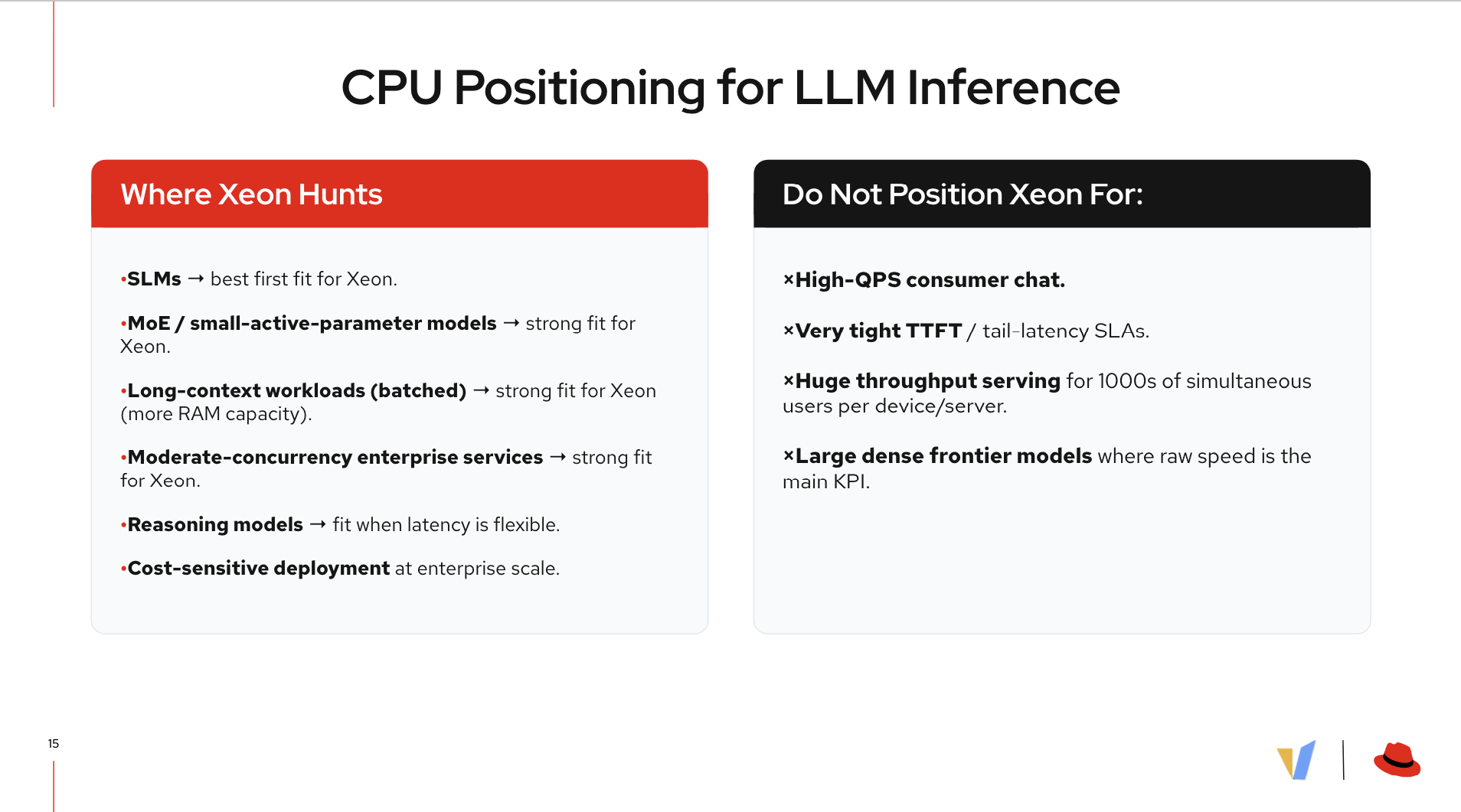
Wiśniewski opened with a clear-eyed positioning of Xeon for LLM workloads. CPU inference is not a fallback for when GPUs are unavailable; it should be the tool of choice for a specific set of workloads.
The fits are strong when:
- Serving small language models (SLMs) where per-token compute is low.
- Running mixture-of-experts (MoE) models with a small active parameter count, where the large DRAM capacity on Xeon servers is beneficial.
- Workloads involve long-context batched inference, where Xeon’s higher memory capacity is an advantage over most GPU configurations.
- Operating at moderate concurrency levels in enterprise settings.
- Cost sensitivity matters more than raw throughput.
The cases where Xeon is the wrong choice are equally specific: high-QPS consumer chat, very tight time-to-first-token or tail-latency requirements, and very large dense models where throughput is the primary metric.
Supported models and features
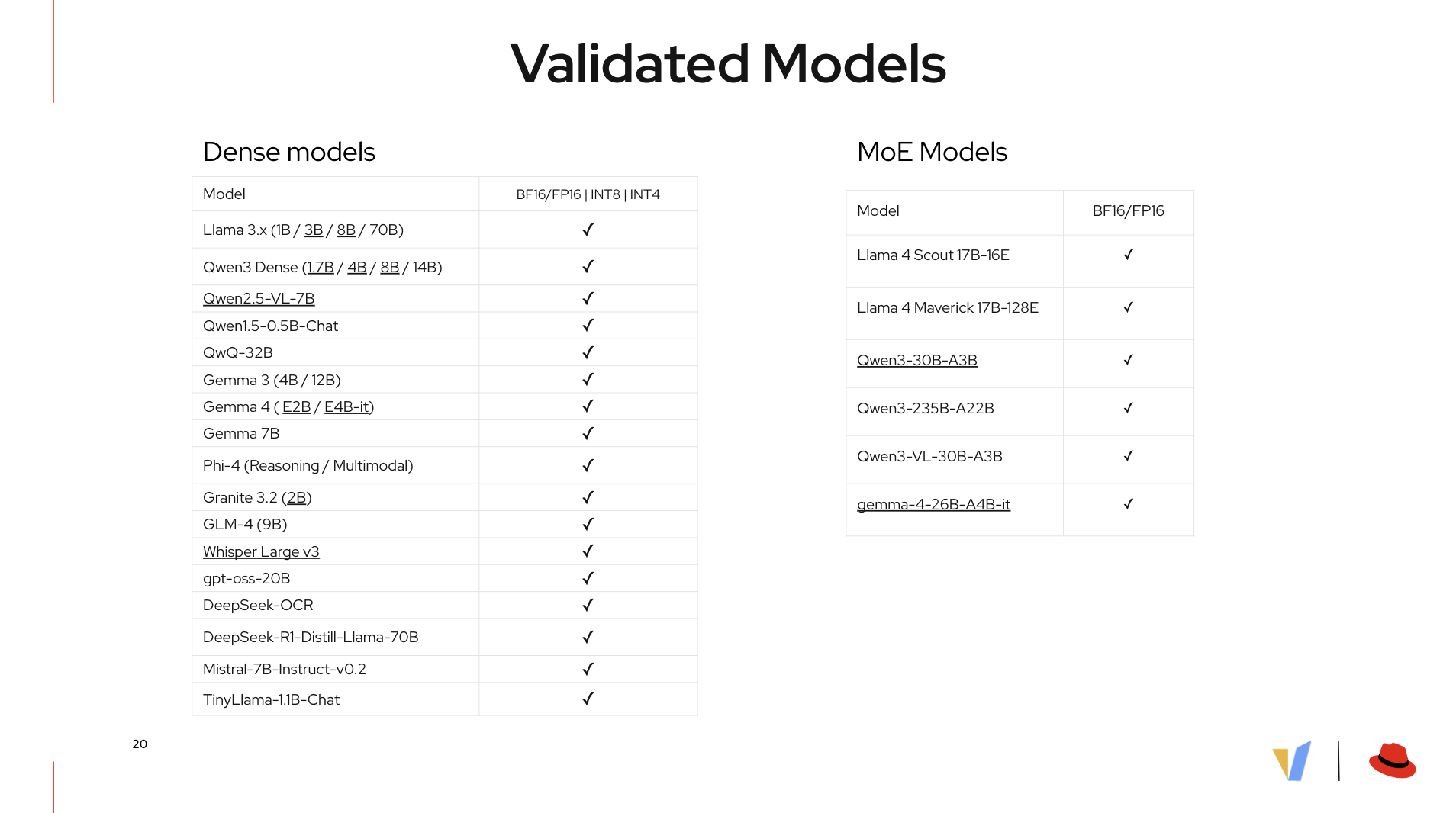
Intel and the vLLM community have validated a substantial set of models on CPU. The current list spans dense and MoE architectures:
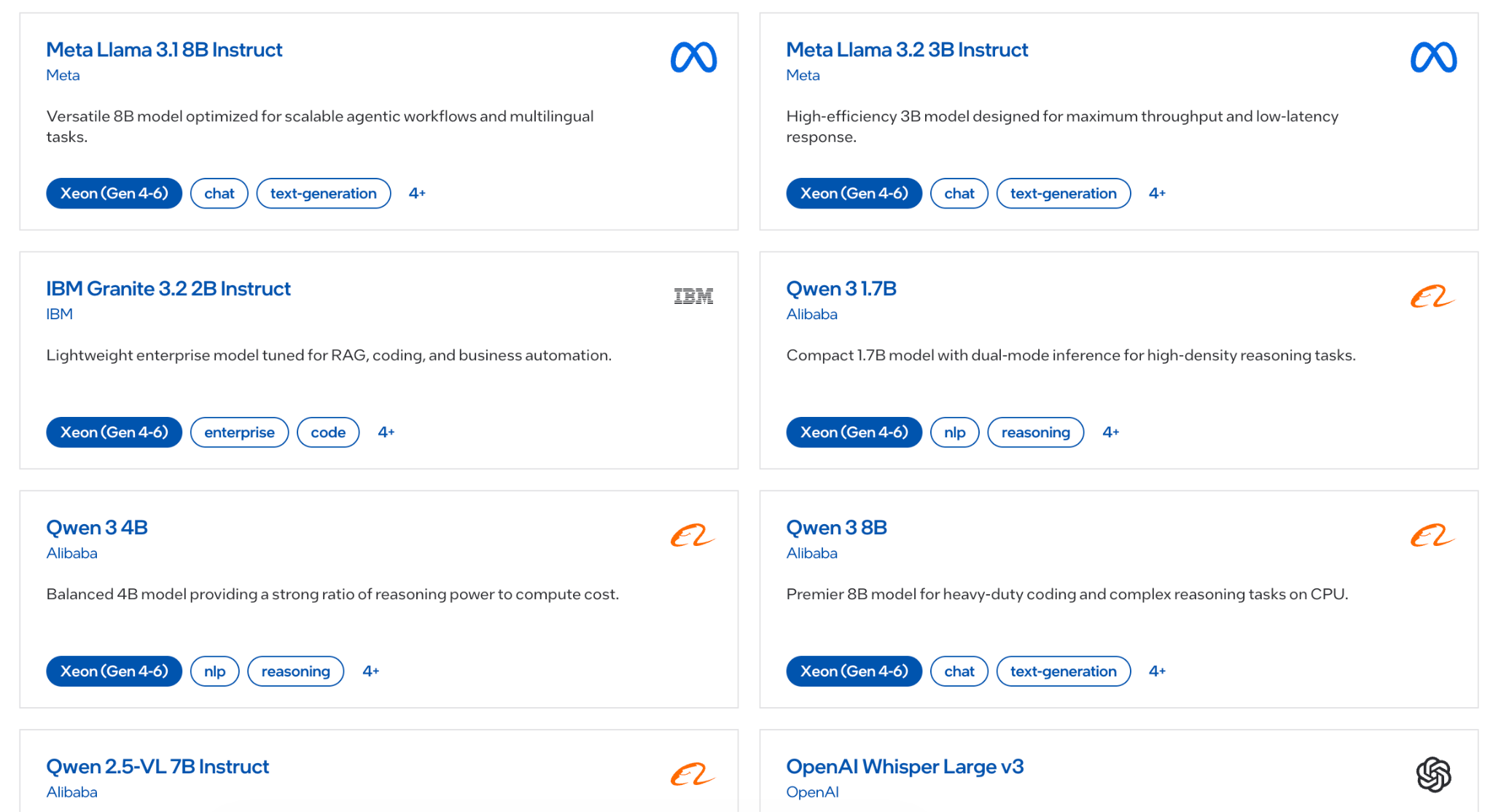

Dense models (BF16/FP16, INT8, INT4): Llama 3.x (1B through 70B), Qwen3 Dense (1.7B through 14B), Qwen2.5-VL-7B, QwQ-32B, Gemma 3 and Gemma 4, Phi-4 (including Reasoning and Multimodal variants), Granite 3.2, GLM-4, Whisper Large v3, Mistral-7B-Instruct-v0.2, DeepSeek-R1-Distill-Llama-70B, and others.
MoE models (BF16/FP16): Llama 4 Scout 17B-16E, Llama 4 Maverick 17B-128E, Qwen3-30B-A3B, Qwen3-235B-A22B, Qwen3-VL-30B-A3B, and gemma-4-26B-A4B-it.
Beyond model coverage, the CPU backend supports structured output, tool calling, torch.compile optimization, quantization, and speculative decoding.
Core pinning matters more on CPU than on GPU
One of the most practically useful parts of the talk covered CPU resource management. Wiśniewski highlighted core pinning and why it matters so much more for CPU inference than GPU inference.
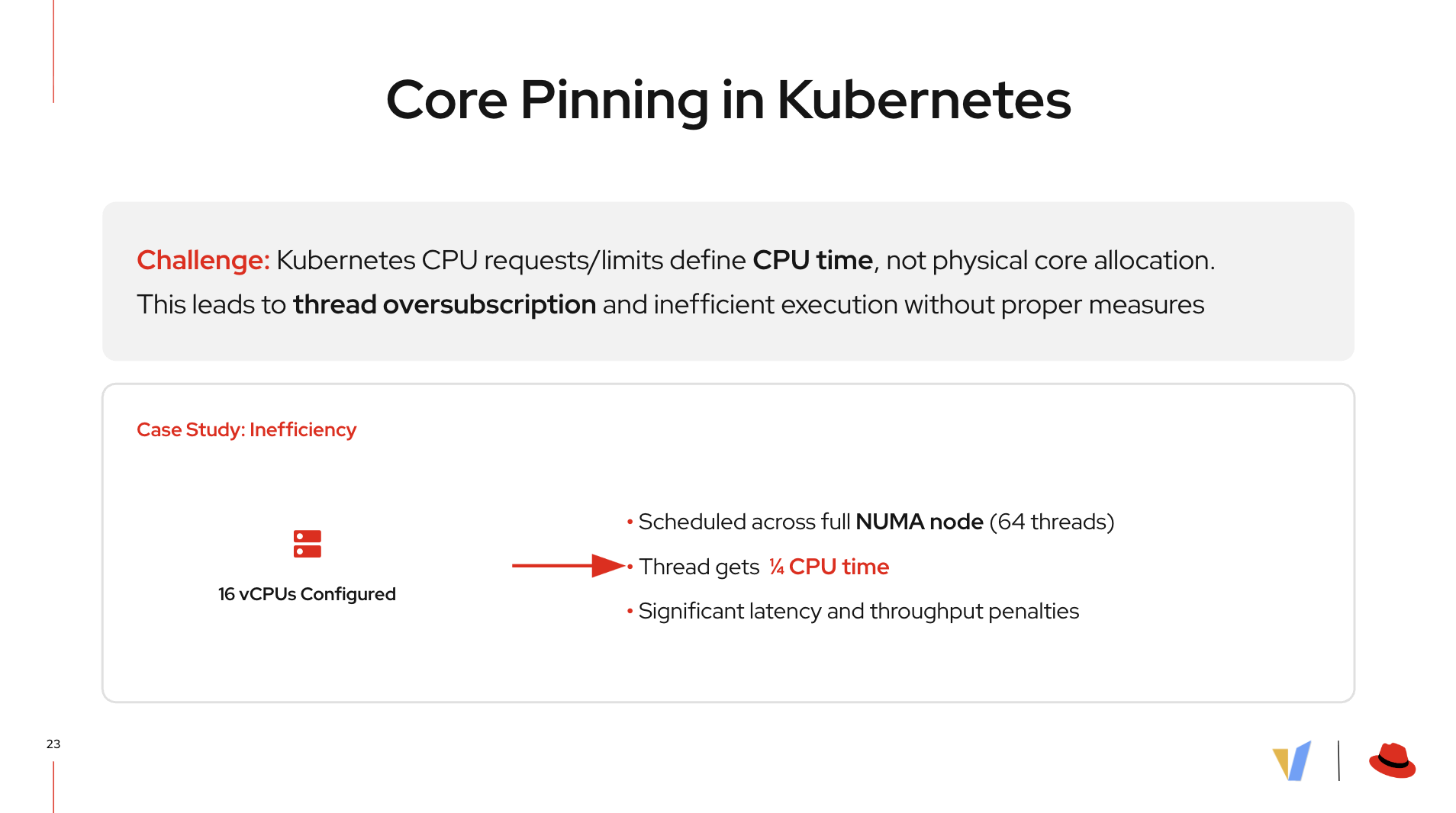
By default, vLLM assigns one NUMA node per rank. That works well when the process actually has exclusive access to the cores on that NUMA node. The problem comes in Kubernetes.
Kubernetes CPU requests and limits define CPU time, not physical core assignment. Without explicit CPU pinning policy, a vLLM process configured for N vCPUs can get scheduled across a much larger NUMA node, say, 16 vCPUs spread across 64 threads, meaning each thread only gets a fraction of its allotted CPU time. The result is measurable latency and throughput penalties from thread oversubscription.
Wiśniewski walked through two solutions:
Kubernetes-native approach: Use the CPU Manager with a static policy combined with the Topology Manager. This provides physical core allocation rather than just CPU time slices. The tradeoff is reduced scheduling flexibility and possible resource underutilization on nodes with mixed workloads.
Intel’s enterprise tooling: The nri-resource-policy-balloons plugin and Intel AI for Enterprise Inference (via the OPEA Enterprise Inference project) both provide automatic core pinning that sidesteps the need to manually configure Kubernetes scheduler policies.
The NRI balloons plugin is a component any cluster operator can use for pinning cores; Enterprise Inference is an end-to-end LLM serving stack for Intel Xeon.
For teams already running OpenShift or Kubernetes-native infrastructure, understanding which approach fits your deployment pattern is worth testing before putting CPU-based vLLM workloads into your production environment.
Scaling a CPU inference deployment
Wiśniewski laid out a practical three-step scaling framework:
- Start with one NUMA node as one rank. This is the default recommendation and the right baseline.
- Tune the single instance first. Optimize latency before you scale out. Adding replicas to a poorly-tuned instance multiplies the inefficiency.
- Choose your scaling path based on latency. If single-instance latency meets your SLA, add replicas to handle higher concurrency. If latency is not yet at target, scale tensor parallelism by adding another rank.
For embedding and reranking workloads, the guidance is different: these models need fewer cores. Wiśniewski recommended starting at four physical cores per replica of an embedding or reranking model.
Getting started with vLLM on Xeon today
Intel maintains an AI Software Catalog as the central resource for validated configurations, models, and deployment scripts. The catalog includes:
- Validated model list with quantization levels.
- Example deployment solutions.
- The Xeon AI Performance Advisor tool, which simplifies CPU configuration selection for AI workloads and reduces time-to-decision from weeks to minutes.
Intel Xeon processors are available across all major cloud service providers, so the patterns from this session apply whether you are running on-premises or in a public cloud.
4th generation Intel Xeon introduced Intel Advanced Matrix Extensions (Intel AMX), which accelerates matrix operations and meaningfully speeds up inference for supported models.
Watch the full session
The recording from Office Hours #50 is available here. The slide deck is also available.
Want to try vLLM on CPU yourself? Start with the vLLM CPU documentation and check the Intel AI Software Catalog for validated model configurations.